Building SaltHub: How Using React-Icons Streamlined Our Frontend Development Workflow
2023-05-09
This is a continuation blog post from Salthub. For this part 4, I'll be sharing another benefits of me being a Frontend Developer with a background of UX/UI Designer.
For this blog post, I'll be sharing about how I close the bridge between Design and Frontend Development.
Icons are an important part of web development and are commonly used to enhance the user experience by providing visual cues and improving the overall design of the application. Icons are often used to represent actions, features, or concepts in a graphical way that is easy to understand and recognise. In web development, there are many ways to add icons to an application, including creating custom icons, using pre-made icon sets, or using plugins to import icons directly from design tools like Figma. Choosing the right approach for adding icons to your application can have a significant impact on the development process and the overall user experience.
As for Salthub project, I lead my Frontend Team to choose the React-Icons plugin for Figma. Design/Figma: Here is the plugin if you're interested. Fronted/ Coding: Here is the documentation to use React-Icons if you're interested.
Below are the advantages of using the React-Icons plugin for Figma and React-Icons for our Frontend Team:
-
Seamless integration with React-Icons and Figma: The react-icons plugin for Figma allows us to easily import icons directly into their designs and seamlessly integrate them with React. This can help to streamline the design process and reduce the amount of time it takes to create new designs.
-
Consistent icon usage: Using a plugin like react-icons can help to ensure consistent usage of icons across the design team. The plugin provides a library of commonly used icons that can be easily accessed by all team members, helping to ensure that everyone is using the same icons and that they are being used correctly.
-
Smooth transition for us to implement: This means we can use React-Icons for the Frontend Development. React-Icons have a solid documentations and it matches the designs from Figma.
-
Customisable icons: Icons can be resized, recoloured, and styled to fit the design of the application, making it easier to create a cohesive and visually appealing user interface.
-
Widely supported: React-icons is a widely supported library with a large community of users and contributors. This means that the library is frequently updated and maintained, and there are many resources available online to help us: Frontend Developer use the library effectively.
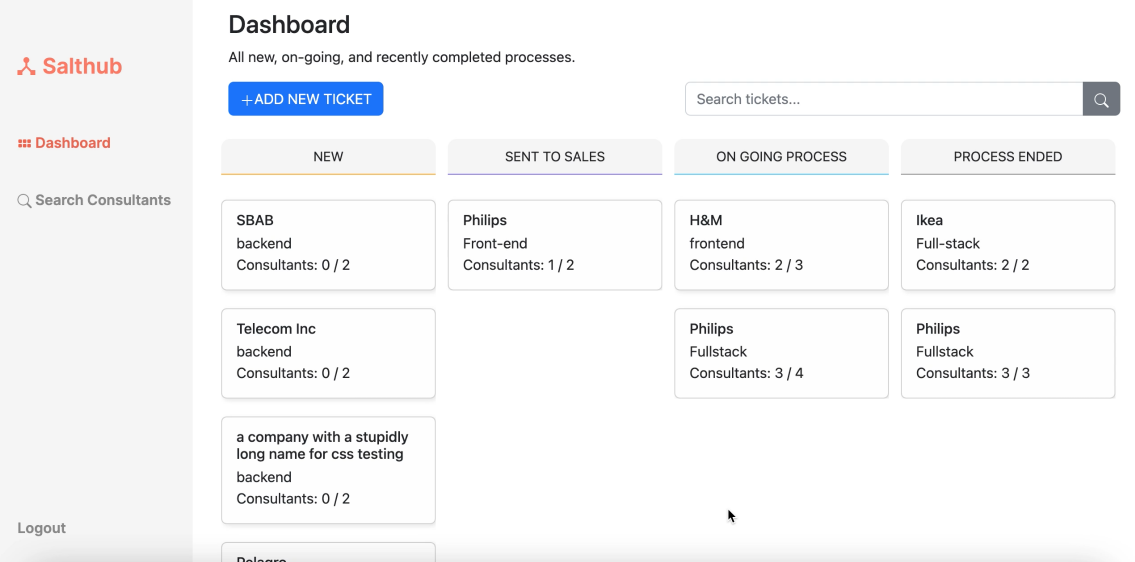
Now that we know the advantages from both Design and Frontend p.o.v., below is an example of how I implement the sidebar component that uses the React-Icons.
import React from 'react';
import salthub_logo from '../../assets/Salthub_logo.svg';
import { Nav, Container } from 'react-bootstrap';
import Image from 'next/image';
import sideBarStyles from './sidebar.module.scss';
import { useRouter } from 'next/router';
import { BsSearch, BsFillGrid3X2GapFill } from 'react-icons/bs';
import { signOut } from 'next-auth/react';

function Sidebar() {
  const router = useRouter();

  return (
    <Container fluid className={sideBarStyles.container}>
      <Nav.Link className={sideBarStyles.titleContainer} href='/'>
        <Image src={salthub_logo} alt="Salthub logo" width={20} height={20}/>
        <p className={sideBarStyles.title}>Salthub</p>
      </Nav.Link>
      <Nav>
          <Nav.Link href='/delivery' className={`${sideBarStyles.items} ${router.pathname === '/delivery' ? sideBarStyles.activeItem : ''}`}><BsFillGrid3X2GapFill width={12} height={12}/> Dashboard </Nav.Link>
          <Nav.Link href='/delivery/searchconsultants'className={`${sideBarStyles.items} ${router.pathname === '/searchconsultants' ? sideBarStyles.activeItem : ''}`}><BsSearch width={12} height={12}/> Search Consultants</Nav.Link>
      </Nav>
      <Nav.Link className={sideBarStyles.logout} onClick={()=> signOut({callbackUrl: 'https://salthub-frontend-salthubbies.vercel.app/'})}>Logout</Nav.Link>
    </Container>
  )
}

export default Sidebar
Here's the screenshot:
Conclusion:
In summary, using the react-icons plugin in our Frontend Team provides a centralized source of icons that can be easily integrated into our React components. This helps to ensure consistent icon usage, streamline development, and provide a library of pre-made icons that can be quickly and easily customized to match the design of the application. Additionally, react-icons is a widely supported library with a large community of users and contributors, making it a reliable and well-maintained choice for my Frontend Team.
I highly encourage readers to try out the react-icons plugin for themselves and see how it can improve their workflow. By using the plugin, you can take advantage of a library of pre-made icons that can help to speed up development and ensure consistent usage across your team. Additionally, the ability to customize icons to fit the design of your application can help to create a cohesive and visually appealing user interface. Overall, the react-icons plugin is a great choice for any Frontend Team looking to improve their workflow and create better user experiences. Design/Figma: Here is the plugin if you're interested. Fronted/ Coding: Here is the documentation to use React-Icons if you're interested.
Also on codewithkatyrosli.com
Understanding Functions and Scope in JavaScript: Building Modular and Reusable Code, 2023-05-14
Functions are fundamental building blocks in JavaScript that allow you to encapsulate reusable blocks of code. They provide a way to define a set of instructions that can be executed whenever needed. Functions play a crucial role in organising code, promoting reusability, and enhancing the overall structure of your JavaScript programs.